



Bitaxe mining l'efficienza aumenta fino a 60% con la corretta configurazione della suite AxeBench. Questo incremento delle prestazioni rende la configurazione corretta essenziale sia per i minatori esperti che per i nuovi arrivati alle operazioni di Bitcoin mining.
La suite AxeBench funge da toolkit principale per l'ottimizzazione dei dispositivi Bitaxe. Il pacchetto software include i componenti AxeBench, AxeSim e AxeLive che operano sulle piattaforme Windows, Linux e Umbrel. Ogni componente si concentra su aspetti specifici della gestione dell'hardware di mining.
La Suite AxeBench v3.0 introduce il Motore Auto-Tune, il miglioramento più significativo per il software di tuning Bitaxe. Questo sistema offre benchmarking più rapido, un migliorato rilevamento dei passi e una mappatura ottimizzata di tensione/frequenza. I protocolli di sicurezza proteggono l'hardware di mining durante tutte le operazioni di tuning.
La suite include moduli specializzati per le operazioni di mining in solitaria. I moduli AxeBTC, AxeBCH e AxeDGB si collegano direttamente ai pool di mining in solitaria. L'integrazione del nodo Umbrel abilita capacità di hosting continue per la gestione del mining sempre attivo.
Questa guida copre i requisiti di installazione e le procedure di configurazione per tutti i modelli Bitaxe supportati. Le procedure di configurazione vanno dall'installazione di base ai parametri di tuning avanzati specifici per il tuo hardware di mining.

Mineshop.eu ha in magazzino l'intera gamma di minatori domestici Bitaxe e NerdQAxe, con spedizione tramite DHL/FedEx in tutta Europa. La maggior parte degli ordini viene spedita dall'Irlanda e dalla Lettonia. Mineshop fornisce minatori UE dal 2016. L'hardware per questa guida — incluso il Bitaxe Gamma 601, Bitaxe Ultra 204 e NerdQAxe+ — è prodotto da Proto.xyz ed è disponibile con pieno supporto della garanzia UE.
Minatori Bitaxe supportati e requisiti
La compatibilità della Suite AxeBench si estende a più Bitaxe famiglie di dispositivi di mining. L'identificazione corretta dell'hardware e la preparazione del sistema determinano il successo della configurazione.
Hardware di mining compatibile
La Suite AxeBench v3.0 fornisce profili di dispositivo ottimizzati per questi modelli Bitaxe:
Serie Supra
-
Profili di tuning per l'efficienza massima
-
Supporto migliorato per la gestione termica
Varianti Ultra e Max
-
Compatibilità completa con i profili avanzati
-
Ottimizzazione delle prestazioni estesa
Serie Hex e Gamma (601/602)
-
Algoritmi di previsione termica
-
Supporto completo dei dispositivi
-
Miner NerdQAxe standard
-
Modelli QAxe+ e QAxe++
-
Parametri di tuning specializzati
Il motore Auto-Tune applica benchmarking più rapidi e mappatura della tensione a tutti i dispositivi supportati.

Requisiti di sistema
Sistemi Windows:
-
Richiesto Windows 10 o versioni successive
-
Formato EXE autonomo (nessuna installazione di Python)
-
Minimo 2GB di RAM, consigliati 4GB
-
500MB di spazio libero su disco
-
Nessuna dipendenza aggiuntiva
Sistemi Linux:
-
Distribuzione Linux moderna
-
Compatibilità WSL per gli utenti di Windows
-
Connettività di rete per la rilevazione dei miner
Le applicazioni desktop avviano l'interfaccia web su http://[YOUR_PC_IP]:5000 accessibile da qualsiasi dispositivo di rete.
Prerequisiti Umbrel
Umbrel la configurazione del nodo richiede le seguenti specifiche:
-
Umbrel versione OS 0.5.0 minima
-
4 GB di RAM allocata
-
10 GB di spazio di archiviazione libero
-
Connessione Internet stabile
-
Accesso alla rete per la rilevazione dei dispositivi
-
Installazione di Git per i repository manuali
Requisiti di archiviazione blockchain:
-
Modulo AxeBTC: 500GB (blockchain Bitcoin)
-
Modulo AxeBCH: 200GB (dati Cash Bitcoin)
-
Modulo AxeDGB: 50GB (blockchain DigiByte)
L'accesso a GitHub deve essere disponibile per l'integrazione dell'URL dello store della community durante la configurazione iniziale.
Integrazione AxeBench Suite Umbrel
L'installazione del nodo Umbrel fornisce l'accesso diretto agli strumenti di gestione del mining di AxeBench Suite dal tuo server domestico. Il processo di installazione dello Store della Community richiede l'accesso a specifici repository e passaggi di configurazione.
Accesso allo Store della Community Umbrel
Apri la dashboard di Umbrel tramite l'indirizzo IP del tuo nodo in qualsiasi browser web. Fai clic sull'icona "App Store" dal menu della dashboard. Seleziona la scheda "Community" per accedere alle applicazioni di terze parti.
L'attivazione della scheda Community richiede le Impostazioni > Configurazione avanzata se non visibile. Le versioni più recenti di Umbrel abilitano in genere automaticamente questa opzione. L'interruttore dello Store delle App della Community deve essere attivato per l'accesso al repository.
Configurazione dell'URL del repository
Fai clic su "Aggiungi repository" all'interno dell'interfaccia della scheda Community. Incolla il seguente URL del repository nella casella di dialogo:
https://github.com/WillItMod/umbrel-community-store
Questo repository contiene i componenti AxeBench, AxeSim, AxeLive, AxeDGB e AxeBCH. Fai clic su "Aggiungi" per completare l'integrazione del repository. Il sistema si aggiorna automaticamente e visualizza le applicazioni AxeBench disponibili.
Verifica dell'installazione
Sfoglia gli elenchi dello Store della Community per confermare l'aggiunta riuscita del repository. Dovrebbero apparire cinque nuove applicazioni:
-
AxeBench – Benchmarking e gestione della flotta
-
AxeSim – simulatore di prestazioni Bitaxe
-
AxeLive – Dashboard di monitoraggio in tempo reale
-
AxeDGB – Nodo DigiByte con pool di mining in solitaria
-
AxeBCH – Nodo Bitcoin Cash con pool di mining in solitaria
L'integrazione completa del repository consente la selezione dei componenti per l'installazione. Configura qui la tua Axebench SUITE tramite le procedure di installazione dei componenti nella sezione successiva.
Installazione e avvio di AxeBench Suite
L'aggiunta del repository allo Store della Community di Umbrel consente l'installazione di AxeBench Suite per le operazioni di mining Bitaxe.
Guida all'installazione di AxeBench passo dopo passo
Trova la scheda dell'applicazione AxeBench nel tuo Store della Community di Umbrel e fai clic su "Installa". L'installazione richiede da 3 a 5 minuti mentre Umbrel scarica e configura i componenti. Una notifica conferma il completamento riuscito.
Gli utenti di Windows e Linux scaricano l'applicazione desktop nativa dai repository GitHub ufficiali. La versione Windows funziona come file EXE autonomo: non è necessaria l'installazione di Python né dipendenze.
Avvio dell'app dalla dashboard di Umbrel
Dopo l'installazione, l'icona di AxeBench appare sulla tua dashboard di Umbrel. Fai clic sull'icona per avviare l'applicazione. L'accesso diretto funziona tramite http://umbrel.local:5000 o l'indirizzo IP del tuo Umbrel.
Configura qui la tua Axebench SUITE utilizzando il pulsante di configurazione durante il primo avvio.
Panoramica dell'interfaccia iniziale
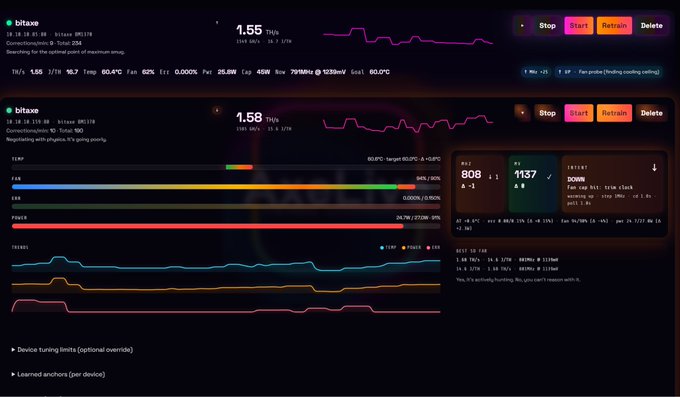
L'interfaccia a tema scuro unificato visualizza le opzioni di navigazione: [ ⚡ Bench ] [ 🏠 Shed ] [ 🎱 Pool ]. I pod di monitoraggio in tempo reale mostrano i dispositivi connessi, la cronologia dell'hashrate, il consumo di energia e le letture della temperatura.
L'interfaccia del motore Auto-Tune fornisce controlli per la scansione e l'ottimizzazione dei miner connessi. Le funzioni di sicurezza proteggono i dispositivi durante le operazioni di tuning.
AxeBench Configurazione per i modelli Bitaxe
La configurazione della suite AxeBench varia in base al modello del miner. Il motore Auto-Tune v3.0 semplifica le procedure di configurazione per tutti i dispositivi Bitaxe supportati.
Configurazione NerdQaxe++ Rev6 e Rev6.1
La configurazione di NerdQaxe++ Rev6/6.1 inizia nella [⚡ Bench] scheda. Seleziona il tuo dispositivo dal menu a discesa e fai clic su "Connect". Il motore Auto-Tune rileva automaticamente le versioni hardware. I modelli Rev6 richiedono l'attivazione di "Safe Mode" durante la configurazione iniziale. I dispositivi Rev6.1 funzionano immediatamente con parametri di tuning standard.
NerdOctaxe e connessione NerdQaxe++
NerdOctaxe I dispositivi [🏠 Shed] utilizzano la sezione per la configurazione multi-miner. La connessione avvia automaticamente i test di stabilità. I modelli NerdQaxe++ utilizzano profili dispositivo raffinati che ottimizzano le prestazioni mantenendo i limiti termici.
Configurazione Avalon Nano 3S e Mini 3
Avalon Nano 3S richiede la selezione di "Advanced Mode" nelle impostazioni. I parametri di tensione funzionano meglio tra 0.38-0.42V per un'efficienza ottimale. I modelli Mini 3 traggono vantaggio dall'attivazione di Quiet Tune , che offre una gestione termica superiore durante il funzionamento continuo.
Avalon Q Parametri di tuning
Avalon Q I minatori utilizzano funzionalità avanzate di previsione termica in AxeBench v3.0. Le impostazioni di alimentazione vengono regolate in modo incrementale, partendo dal 80% della capacità fino alla conferma della stabilità. Il sistema salva le configurazioni ottimizzate nei profili del dispositivo al termine del benchmarking.
Monitoraggio delle prestazioni con AxeBTC, AxeDGB e AxeBCH
Il Cockpit di monitoraggio live traccia le prestazioni del miner ottimizzato tramite flussi di dati in tempo reale. I moduli AxeBTC, AxeDGB e AxeBCH visualizzano le cronologie dell'hashrate, il consumo energetico e le metriche di temperatura. L'interfaccia AxePool si collega direttamente ai pool di mining in modalità solitaria senza requisiti di configurazione aggiuntivi. La protezione termica mantiene la sicurezza operativa interrompendo i processi quando le temperature superano 65.9°C.

Conclusione
AxeBench Suite v3.0 fornisce gli strumenti essenziali per operazioni professionali di mining Bitaxe. Il motore Auto-Tune ottimizza le prestazioni su Supra, Ultra, Hex, Gamma e NerdQAxe dispositivi della famiglia con protocolli di sicurezza migliorati e gestione termica.
La flessibilità della piattaforma supporta installazioni Windows, Linux e Umbrel. L'interfaccia unificata gestisce singoli miner o intere flotte tramite il monitoraggio in tempo reale dell'hashrate, del consumo energetico e delle metriche di temperatura. I moduli specializzati AxeBTC, AxeBCH e AxeDGB abilitano connessioni dirette ai pool di mining in modalità solitaria.
I profili del dispositivo e la previsione termica proteggono l'hardware di mining massimizzando al contempo l'output delle prestazioni. Il sistema interrompe automaticamente il funzionamento a 65.9°C per prevenire danni termici. La logica dell'alimentatore e la mappatura della tensione garantiscono un funzionamento stabile durante i periodi di mining prolungati.
Una corretta configurazione e un monitoraggio adeguato determinano il successo del mining oltre la semplice scelta dell'hardware. AxeBench Suite offre queste funzionalità tramite il suo motore di tuning e l'interfaccia di monitoraggio. Inizia l'implementazione con il tuo specifico modello Bitaxe per raggiungere l'efficienza di mining ottimale.
Punti chiave
Padroneggia il processo di configurazione essenziale per AxeBench Suite per sbloccare fino a 60% di maggiore efficienza di mining dai tuoi dispositivi Bitaxe tramite una corretta configurazione e monitoraggio.
• Il motore Auto-Tune di AxeBench Suite v3.0 offre un benchmarking 60% più veloce con una mappatura della tensione più intelligente e funzionalità di sicurezza migliorate su tutti i modelli Bitaxe.
• L'installazione è flessibile in termini di piattaforma: Windows non richiede dipendenze (EXE autonomo), Linux supporta WSL e Umbrel richiede 4GB di RAM con accesso al community store.
• La compatibilità dei dispositivi copre l'intero ecosistema Bitaxe inclusi le serie Supra, Ultra, Hex, Gamma e la famiglia NerdQAxe, con profili ottimizzati per ciascun modello.
• L'integrazione Umbrel fornisce una gestione del mining sempre attiva tramite i moduli AxeBTC, AxeBCH e AxeDGB per le operazioni di mining in pool solitario.
• Il monitoraggio in tempo reale previene danni all'hardware con una protezione termica che arresta automaticamente il funzionamento a 65.9°C, tracciando hashrate e consumo energetico.
L'interfaccia a tema scuro unificato con [⚡ Bench] [🏠 Shed] [🎱 Pool] per la navigazione rende semplice la gestione di singoli minatori o di intere flotte, mentre la Live Monitoring Cockpit garantisce prestazioni ottimali attraverso la supervisione continua del tuo investimento in mining.
FAQ
Q1. Come installo AxeBench Suite sul mio nodo Umbrel? Per installare AxeBench Suite su Umbrel, accedi al Community Store, aggiungi l'URL del repository e quindi installa i componenti desiderati dall'elenco delle app. Assicurati che il tuo sistema operativo Umbrel sia di versione 0.5.0 o superiore e che disponga di almeno 4GB di RAM e 10GB di spazio di archiviazione libero.
Q2. Quali modelli di minatori Bitaxe sono compatibili con AxeBench Suite v3.0? AxeBench Suite v3.0 supporta un'ampia gamma di minatori Bitaxe, tra cui le serie Supra, Ultra, Max, Hex, Gamma (601/602) e la famiglia NerdQAxe (NerdQAxe standard, QAxe+ e QAxe++). Ogni modello dispone di profili dispositivo ottimizzati per la massima efficienza.
Q3. In che modo il motore Auto-Tune in AxeBench Suite v3.0 migliora le prestazioni di mining? Il motore Auto-Tune in v3.0 offre benchmarking fino a 60% più veloce, una migliore rilevazione dei passi e una mappatura più intelligente di tensione/frequenza. Mantiene una logica di sicurezza rafforzata per proteggere il tuo investimento ottimizzando al contempo le prestazioni su tutti i modelli Bitaxe supportati.
Q4. Posso monitorare le prestazioni dei miei minatori Bitaxe in tempo reale utilizzando AxeBench Suite? Sì, AxeBench Suite offre il monitoraggio in tempo reale tramite la sua Live Monitoring Cockpit. Puoi tracciare le tempistiche dell'hashrate, le metriche di consumo energetico e le letture di temperatura dei tuoi minatori. Il sistema include anche una protezione termica, che arresta automaticamente il funzionamento se le temperature superano 65.9°C.
Q5. Quali sono i requisiti di sistema per eseguire AxeBench Suite su Windows? Per gli utenti di Windows, AxeBench Suite richiede Windows 10 o versioni successive, almeno 2GB di RAM (4GB consigliati) e 500MB di spazio su disco libero. È fornito come file EXE autonomo, non richiede l'installazione di Python né dipendenze aggiuntive, rendendolo facile da configurare e utilizzare.
Comments (0)