



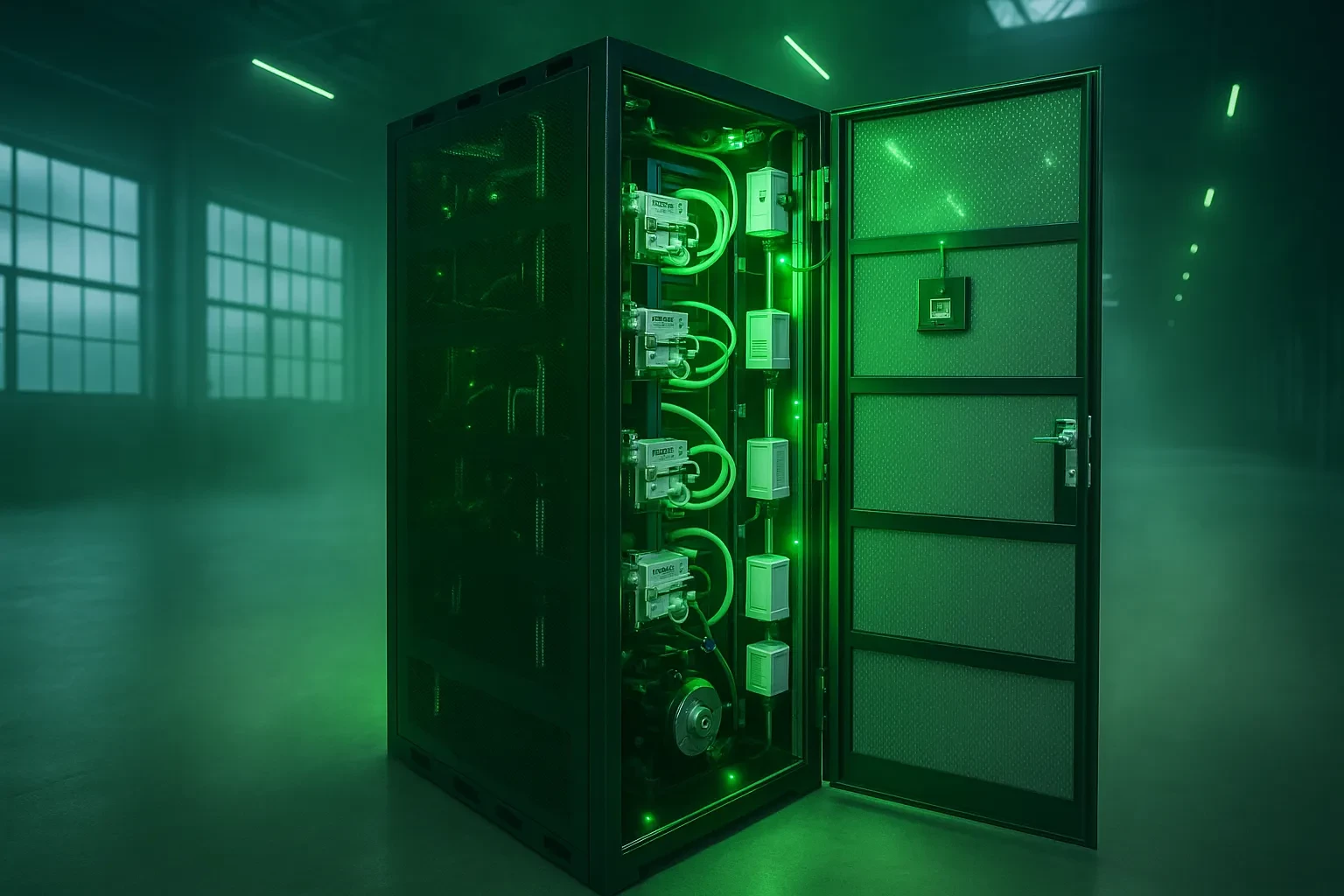
Want to maximize your mining efficiency with the bitmain anttrack v1 setup? This advanced mining unit generates an impressive $80.7 in daily revenue and offers a quick payback period of 0.89 years.
The ANTRACK V1 houses four Antminer hydro miners that combine powerful specifications with innovative cooling technology. The unit's substantial 24 kW power capacity handles intensive cryptocurrency mining operations while keeping optimal performance. The system's strong construction ensures lasting durability with dimensions of 600mm width, 2000mm height, and 1000mm depth[-4].
This detailed Antrack V1 manual helps you understand the installation process from unpacking to system configuration. Our Antrack V1 tutorial covers everything you need to know, whether you're new to Bitmain setup or upgrading your mining operation. Let's take a closer look at this step-by-step installation guide to get your mining operation running at peak efficiency!
About This Manual
This detailed guide will help you set up and run the Bitmain ANTRACK V1 system successfully. The Product Manual helps you use the ANTRACK V1 Cabinet properly. You'll find everything you need for a smooth installation right here in these pages.
Purpose and scope of the guide
This Antrack V1 manual gives you the technical information you need for the best setup and operation. You'll find specifications, setup instructions, maintenance protocols, and troubleshooting advice that ensure peak performance. The guide also has detailed information about coolant requirements, power supply configurations, and networking options you need for proper Bitmain setup.
The guide goes beyond simple installation and includes significant operational guidelines. You'll see recommended coolant flow parameters, maintenance schedules, and optimal operating temperatures that help maximize mining efficiency. The guide also covers waste heat recovery options and system optimization techniques for users interested in advanced features.
Who should use this manual
Technical professionals handling the Bitmain Anttrack V1 setup will find this guide most useful. New installers will appreciate the step-by-step instructions, and experienced technicians can use it to look up specific parameters and troubleshooting steps. The maintenance sections help data center managers ensure long-term operational stability.
System performance monitors should check the sections on environmental requirements and operational parameters. The coolant management and cleaning procedures will help maintenance personnel keep the system running longer.

How to guide through the sections
The manual starts with basic concepts and moves to advanced operations:
-
Safety Precautions - Critical warnings before handling any components
-
Overview - System architecture and capabilities explanation
-
Installation - Detailed setup procedures from unpacking to power-on
-
Maintenance - Regular care instructions and troubleshooting guidance
Each section has clearly marked subsections that address specific aspects of the Antrack V1 installation. The troubleshooting section helps you resolve issues quickly. Cross-references between related topics give you context and a full understanding of the system.
Safety Precautions
Safety should be your top priority when setting up your Bitmain ANTRACK V1. Taking proper precautions protects your equipment from damage and keeps you safe during installation and operation.
Electrical safety and voltage warnings
Your ANTRACK V1 has specific power requirements you must follow strictly. The system needs an AC input voltage between 380-415V and operates at a frequency range of 50-60 Hz. Your miners could suffer severe damage if you use incorrect voltage.
The power switch must be off before you connect or disconnect any cables. Dangerous arcs or sparks can occur if cable cores touch conductors. The ANTRACK V1 runs on three-phase AC input, so you need proper electrical knowledge to handle it safely.
You should not try to replace or alter equipment parts without proper training, as this could create serious safety risks.
Handling liquid cooling components
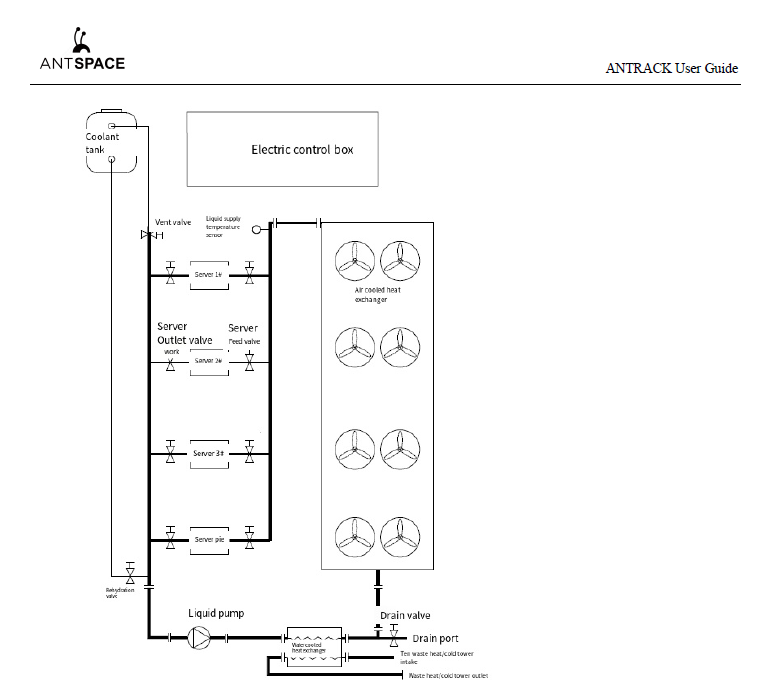
The liquid cooling system needs careful handling to avoid damage. You can use either deionized water/pure water or antifreeze (10%) as working fluid. The pH level should stay between 7.8-9.5.
High-pressure components need extra attention during operation, especially exhaust and drain valves. The coolant might eject if you handle these components incorrectly.
The water conductivity needs careful monitoring - replace the fluid right away if it hits ≥100 μs/cm. The system performs best when water conductivity stays below 20 μs/cm during initial operation.
Environmental and operational safety
Your ANTRACK V1 needs specific environmental conditions to work properly. The ambient temperature should stay between 15-45°C, while storage temperature can range from -20-70°C. The system is strong but requires humidity levels between 10-90% non-condensing.
The unit needs a well-ventilated space with enough room around it. Keep the device away from heat sources, direct sunlight, and anything that could cause ignition.
Protective gloves are essential when you work with the metal cabinet and heat exchangers to ensure long-term safety.
Overview
The Bitmain ANTRACK V1 marks a revolutionary step forward in cryptocurrency mining technology. This rack-mounted system works as a specialized housing unit for hydro-cooled mining equipment.
What is the Bitmain ANTRACK V1
The ANTRACK V1 stands out as an advanced mining unit that houses four ANTMINER hydro miners in a single integrated framework. The system's sophisticated hydro-cooling technology optimizes mining operations and manages heat dissipation. The unit functions as a complete ecosystem that delivers high-performance cryptocurrency mining.
Key features and specifications
The ANTRACK V1's strong 24 kW maximum power capacity handles intensive mining operations well. The unit measures 600mm width × 2000mm height × 1000mm depth and weighs approximately 300kg. Network connectivity happens through RJ45 Ethernet 10/100M interface. The system needs three-phase AC input with voltage range of 380~415V, frequency of 50~60Hz, and input current of 80A.
Supported Antminer models
Multiple Antminer hydro series models work with the ANTRACK V1. The system supports both S19 Hydro and S21 Hydro series miners. Each rack features four slots designed specifically for these hydro-cooling miners.
Understanding the hydro-cooling system
Liquid circulation in the hydro-cooling system keeps operating temperatures at optimal levels. Water flow rates should stay between 32.0~40.0 L/min with pressure ≤3.5 bar. The system runs on either deionized water/pure water or 10% antifreeze solution with pH levels between 7.8~9.5.
Get your Antrack V1 in mineshop.eu today

Installation
Setting up your ANTRACK V1 mining unit correctly will ensure it performs at its best and lasts longer. Let me walk you through the setup process step by step.
Unpacking and inspection
Take your ANTRACK V1 out of its packaging and check all exterior and interior components really carefully. Make sure the coolant tank cover and connectors don't have any damage. You should contact the shipping company right away if you spot any issues. Your package needs to include the main hardware, power supply, cables and connectors, and a detailed guidebook.
Positioning the ANTRACK V1 unit
Your ANTRACK V1 needs a clean, well-ventilated space without water, drips, or dust. Keep at least 1 meter of space in front and behind the rack so air flows properly and you can access it for maintenance. This space helps prevent hot air from circulating back and affecting the cooling system.
Connecting power and network cables
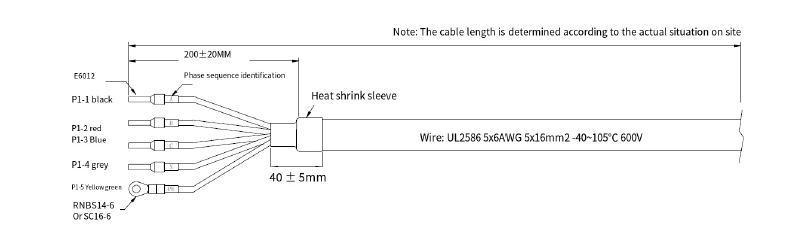
The system needs a three-phase AC input (380-415V, 50-60Hz) with 80A current capacity. Connect a three-phase, five-wire (L1+L2+L3+N+PE) power cable from your power source to the control box. Run an Ethernet cable (Cat.5e-FTP recommended) with RJ45 connector through the top inlet to the P1 port on the internal switch.
Setting up the liquid cooling system
Check that the drain valve is closed before you start. The fill valve, exhaust valve, server supply valve, and server outlet valves should be open. Add about 20L of coolant (10% antifreeze with pH 7.8-8.5) through the red tank cover[214]. Run the pump in 3 ON/OFF cycles, then let it run for 15-30 minutes to get rid of air bubbles.
Integrating waste heat recovery (optional)
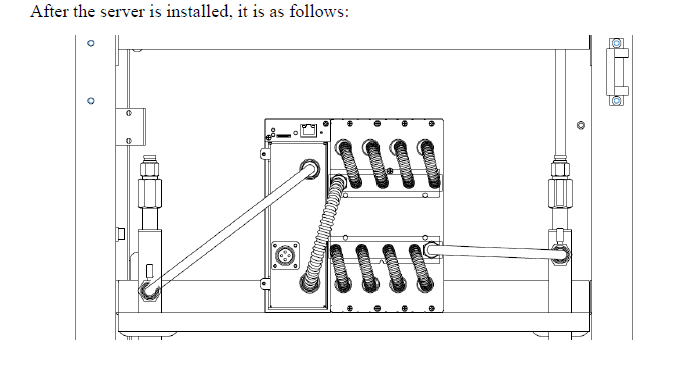
You can connect the waste heat module to the ANTRACK's front interface. The circulator goes on the waste heat base, and the waste heat device fits into its designated port. This setup helps you utilize heat efficiently.
Initial power-on and system check
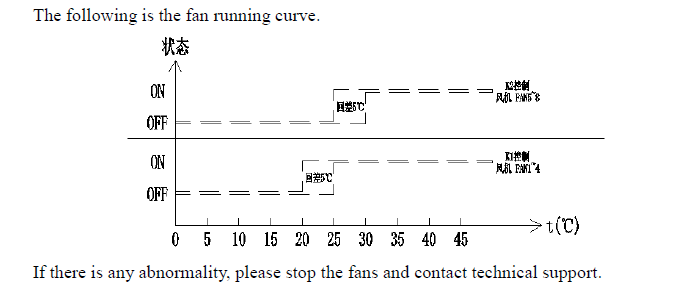
Start by turning on the fan switch and watch the coolant temperature controller. The fans should start working once the temperature goes above 25°C. Let it run normally for 3 minutes, then power up the servers one by one using the control box switches. Set up your network settings and you're ready to start mining.
Maintenance
Your ANTRACK V1 needs regular maintenance to work at its best. These guidelines will help you avoid failures and make your equipment last longer.
Routine cleaning and dust removal
Set up a schedule to inspect your Bitmain Anttrack V1 setup regularly. Look for debris around the cabinet daily and clean dust from the mesh of front/side doors and air-cooled heat exchangers. Power down the miners completely before thorough cleaning. Use an air compressor at 0.7 ± 0.05 MPa pressure. Direct air through the front and rear fans carefully without touching the grilles or fan blades to avoid damage. You might need to remove fans and brush away debris in humid environments where dust becomes stubborn.
Monitoring water quality and PH levels
The right coolant quality is vital for your Antrack V1 installation. Keep liquid PH between 7.8-8.5. Your water conductivity should stay below 100 μs/cm. Replace the fluid right away if conductivity goes above this level. The best practice keeps water conductivity under 20 μs/cm during original operation. Systems with external water sources need specific quality standards: PH value 6-8, chloride concentration ≤50 ppm, sulfate ion concentration ≤30mg/L, and ammonia ion concentration ≤0.1mg/L.
Replacing coolant fluid
Monitor coolant levels daily. Performance issues and equipment damage can happen if levels drop below 1/3 of the tank height. Add appropriate coolant promptly. Power down immediately if you see foreign impurities or yellowish discoloration in the pipes. Clean the whole liquid cooling system thoroughly before adding fresh coolant. You can use either deionized water/pure water or 10% antifreeze solutions for maintenance.
Troubleshooting common issues
Check valve status at liquid cooling pipe joints daily for leaks. Shut down and tighten or replace damaged connections if you find any. Listen for unusual fan and pump noise or vibration patterns—these need immediate technical attention and possible component replacement. Replace vibrating transparent bellows at server liquid connections with smooth hoses from the accessories kit. A proper maintenance log helps you spot recurring problems quickly.
Conclusion
The Bitmain ANTRACK V1 shows evidence of major progress in cryptocurrency mining technology. This powerful system combines 24 kW capacity with innovative hydro-cooling systems. In this piece, you'll find everything about setting up your mining operation, from original unpacking to regular maintenance. These detailed instructions will help you get the best performance and value from your investment.
Your safety comes first when working with electrical components and liquid cooling systems. You must follow voltage specifications and maintain proper coolant quality to avoid equipment damage and injuries. The lifespan of your mining setup will increase without doubt through regular checks of water quality, pH levels, and system components.
The ANTRACK V1 proves to be an excellent investment for serious miners with a quick payback period of 0.89 years. On top of that, it works with multiple Antminer hydro series models, giving you flexibility as your mining operation grows. Get your Antrack V1 in mineshop.eu today and start earning substantial mining revenue.
Note that good maintenance will maximize your system's efficiency. Quick daily checks, regular cleaning, and fast troubleshooting help maintain peak performance. Bitmain's steadfast dedication to advancing mining technology shines through the ANTRACK V1, giving miners a powerful, efficient, and reliable solution for cryptocurrency operations.

Key Takeaways
Master the essential steps to successfully install and operate your Bitmain ANTRACK V1 mining system for optimal cryptocurrency mining performance.
• Safety First: Always use 380-415V three-phase power and maintain coolant pH between 7.8-8.5 to prevent equipment damage and ensure safe operation.
• Proper Installation: Position unit with 1-meter clearance on all sides, connect three-phase power, and fill with 20L coolant before initial startup.
• Daily Maintenance: Monitor water conductivity (keep below 100 μs/cm), inspect for leaks, and clean dust from heat exchangers to maintain peak efficiency.
• Quick ROI: The ANTRACK V1 generates $80.7 daily revenue with just 0.89-year payback period, making it highly profitable for serious miners.
• System Capacity: Houses four hydro miners with 24kW power capacity, supporting both S19 and S21 Hydro series for flexible mining operations.
Following this comprehensive setup guide ensures your ANTRACK V1 operates at maximum efficiency while protecting your investment through proper installation and maintenance protocols.
FAQs
Q1. What is the Bitmain ANTRACK V1 and what are its key features? The ANTRACK V1 is an advanced mining unit designed to house four Antminer hydro miners. It features a 24 kW power capacity, hydro-cooling technology, and supports both S19 and S21 Hydro series miners. The unit measures 600mm x 2000mm x 1000mm and requires three-phase AC input.
Q2. How do I properly set up the liquid cooling system for the ANTRACK V1? To set up the cooling system, close the drain valve and open the fill, exhaust, server supply, and server outlet valves. Add about 20L of coolant (10% antifreeze with pH 7.8-8.5) through the red tank cover. Run the pump in 3 ON/OFF cycles, then continuously for 15-30 minutes to remove air bubbles.
Q3. What are the power requirements for the Bitmain ANTRACK V1? The ANTRACK V1 requires a three-phase AC input with a voltage range of 380-415V and a frequency of 50-60Hz. The input current should be 80A. It's crucial to use the correct voltage to prevent damage to the miners.
Q4. How often should I perform maintenance on the ANTRACK V1? Daily inspections are recommended, including checking for debris, cleaning dust from mesh and heat exchangers, and monitoring coolant levels. Regular monitoring of water quality and pH levels is also crucial. Perform thorough cleaning and coolant replacement as needed based on these daily checks.
Q5. What should I do if I encounter issues with the ANTRACK V1? If you notice leaks, shut down the system and tighten or replace damaged connections. For abnormal fan or pump noises, seek immediate technical attention. If water conductivity exceeds 100 μs/cm, replace the coolant immediately. Always log maintenance activities to identify recurring problems and consult the troubleshooting section of the manual for specific issues.
Comments (0)